
Data quality Your files
What the checks look for in a file, how the findings read, which rows the reports set aside, and why.
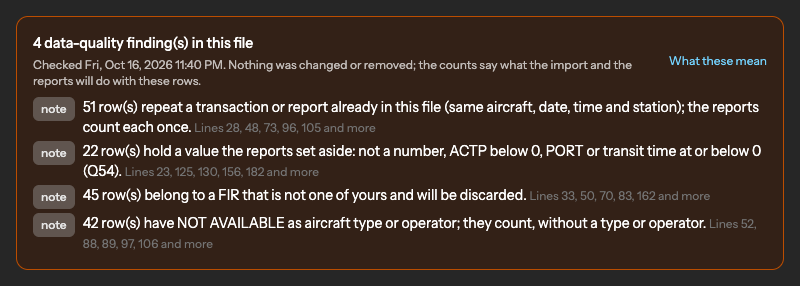
Every file is checked before it is imported, and the findings stay with the upload. Nothing is changed or removed by a check: the findings tell you what the import and the reports will do with the rows, so that you can decide whether the file is the right one.
Where the findings appear
- On the review page of an upload, before you import.
- On the upload's page afterwards, with the lines of the file concerned.
- On the dashboard, as the count of findings and the count of rows set aside in the selected period, with a link to each upload.
A finding is a check when the rows will be rejected or look wrong, and a note when they are counted but worth knowing.
The checks
| Finding | What it means |
|---|---|
| Rows with an empty mandatory field | Rejected at import; the count says how many. |
| Rows whose date cannot be read | Rejected. The date format is confirmed at the review; a row that does not match it is rejected rather than guessed. |
| Dates in the future, or more than ten years old | Counted, and listed for you to check the file. |
| A file that spans more than three months | A file usually holds one month; check that it is the right file. |
| A time stamp earlier than the message that caused it | The row's times contradict each other. |
| A measured time that does not match its time stamps | For example PORT not equal to ACP minus ACTP; the row is kept, and listed. |
| Rows that repeat a transaction or report already in the file | Same aircraft, date, time and station; the reports count each once. |
| Rows already in an earlier upload | The latest upload counts. |
| Values the reports set aside | Not a number, ACTP below zero, PORT or a transit time at or below zero. Kept in the file, left out of the figures. |
| Rows of another FIR | Discarded at import; your plan covers your FIRs only. |
| NOT AVAILABLE as aircraft type or operator | Counted in the figures, without a type or operator. |
| A volume far from your earlier files | Fewer than half, or more than twice, the rows per day of your earlier files; check that nothing is missing or doubled. |
Rows set aside by the reports
Two kinds of row are imported but left out of a figure. Values that cannot be measured, listed above, and CPDLC transactions whose response is anything other than a single WILCO, which the RCP standards exclude. The dashboard and the report pages say how many rows were set aside in the period, and the reports article says how each figure is built. The rows are not deleted: they stay with the upload.
After a rule change
When SkyLink changes a rule of the checks, every imported upload is checked again and its findings are refreshed; the import itself is never rerun without you. If a finding makes you doubt a file, open the upload, correct the file at its source, delete the upload and upload the corrected file; see Uploads.
Not answered here? Write to us.